
















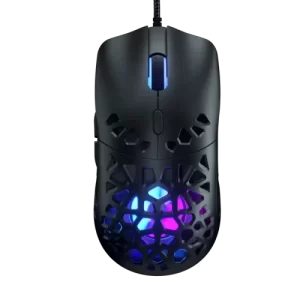
The Marsback Zephyr Pro offering a unique twist, the world’s first-ever sweat-proof gaming house
Are you a workaholic stuck to your computer screens for more than 12 to 16 hours? The minute you take a coffee break, and lay your hands off your mouse, you get an irritating sweaty feel. Well, holding your coffee with wet hands does not seem to be an appealing idea right? Guys! technology can dig into your psyche nowadays. Gosh !!! Now, you have a solution to this endless sweaty hands problem.
Go through our exclusive review Marsback Zephyr Pro gaming mouse review that is undoubtedly changing lives.
What is the Marsback Zephyr pro gaming mouse?
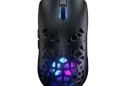
Well, Marsback Zephyr Pro is a unique mouse that comes with a built feature fan. As a result, your hands will remain cool even after hours of use, and will not become sweaty. Zephyr Pro is a refined version of the mouse. The problem with Zephyr was that it had some basic flaws. It vibrated a lot and was quite loud. To overcome this problem, the company introduced Marsback Zephyr Pro.
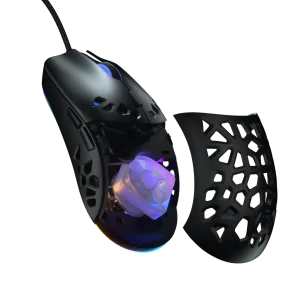
Image reference: marsback.com
Key standout features of Zephyr Pro Gaming Mouse
The sleek design
What is eye-catching is the plastic shell of the mouse that is asymmetric. The geometric hole design adds a unique twist to the outlook of the Marsback Zephyr Pro mouse. The plastic design adds a sturdy feel to the mouse. You got me right, you will not feel any creaking when using the mouse.
The design works well for all righties and lefties. You will find two side buttons on the sides, and there is one button at the top of the mouse. The top button is the DPI switcher, and it is behind the mouse’s scroll wheel.
Exclusive buttons for toggling fan and recycling the RGB
You will find the optical sensor of the mouse beneath it. Plus, there are two extra buttons beneath the mouse. You can toggle the fan with one button, and you can use the other button to recycle the RGB. What is worth mentioning is that every button is customizable.
You can visit the Marsback website to download the optional software for customization.
Miniature fan, the star feature of the mouse
You can view the fan through the shell of the mouse. The appearance is that of a miniature PC fan. The fan gets made from translucent plastic, which works well with RGB. Once, you turn on the fan, you will get to hear a tingling buzz.
The good news is that you can test the efficiency of the fan. Make your hands wet, you will notice the fan will help you get rid of the moisture, and dry out your hands in less than a minute. The company redesigned the angle of the fan from 45 degrees to 180 degrees. As a result, you can look forward to a stronger blast.
The add-on features
You can save about five different profiles on the onboard memory. Plus, you can choose from 7 pre-lighting sets.
Standard System Requirements for Zephyr Pro Gaming Mouse
The positive aspect is the mouse works well with Linux, Mac, or Windows. You will need an internet facility if you want to install the software for the customization.
The Key Perks
- One of the key Marsback Zephyr Pro benefits is that the buttons are responsive, and no aggressive clicking is needed
- The mouse has PTFE feet that make the movement super-fast and easy
- You will get a flexible USB cable with the mouse that never gets into the way of your motions
- The best part is that you can carry the mouse with you because it is compact
What still needs improvement?
The subtle vibration is still there, and the company needs to figure out a way around this problem. Secondly, the overall ergonomics must be more comfortable.
What do you need to know?
What is worth mentioning is that disassembling the mouse is also easy. You will find the screws beneath the rear skate of the mouse. Once you remove the screws at the bottom, you will need to remove the clips from the front.
Value added tips
Now, you fairly understand that Zephyr Pro offers value so you will want the mouse to last for a long time to come. When you want your gaming mouse to last for a long time, then make sure that you clean it after every few days.
Make use of microfiber cloth for cleaning the mouse. However, there are some areas of the mouse that are hard to reach. You do not need to worry at all about this situation. You can make use of a Q-tip to clean the hard-to-reach areas.
It is essential to clean the sensor of the mouse because it will affect the mouse trackability. What you need to do gently clean the sensor with the Q-tip. You can make use of a toothpick to remove the unwanted grime from the mouse. The whole process needs to be done gently because you would not want to end up damaging the mouse.
Our final recommendation
The best part is that you can hold this mouse for hours together because it is lightweight. It only weighs about 69g. You will be happy to know that Zephyr Pro performs with immense accuracy and speed. You also have two color options to make your pick. Go for either the black or the white color.
The website offers responsive chat support. You can put up your queries to the support team to get the answers to your concerns. You will be more confident when you buy the mouse after getting answers to your queries. Plus, you will readily use it in the best way.
You will also be happy with the fact that Zephyr Pro is more affordable in comparison to Zephyr. You can purchase pro for $59 which is pretty cost-friendly. If you want to enhance your gaming experience, buy this mouse now.